LoRA & QLoRA
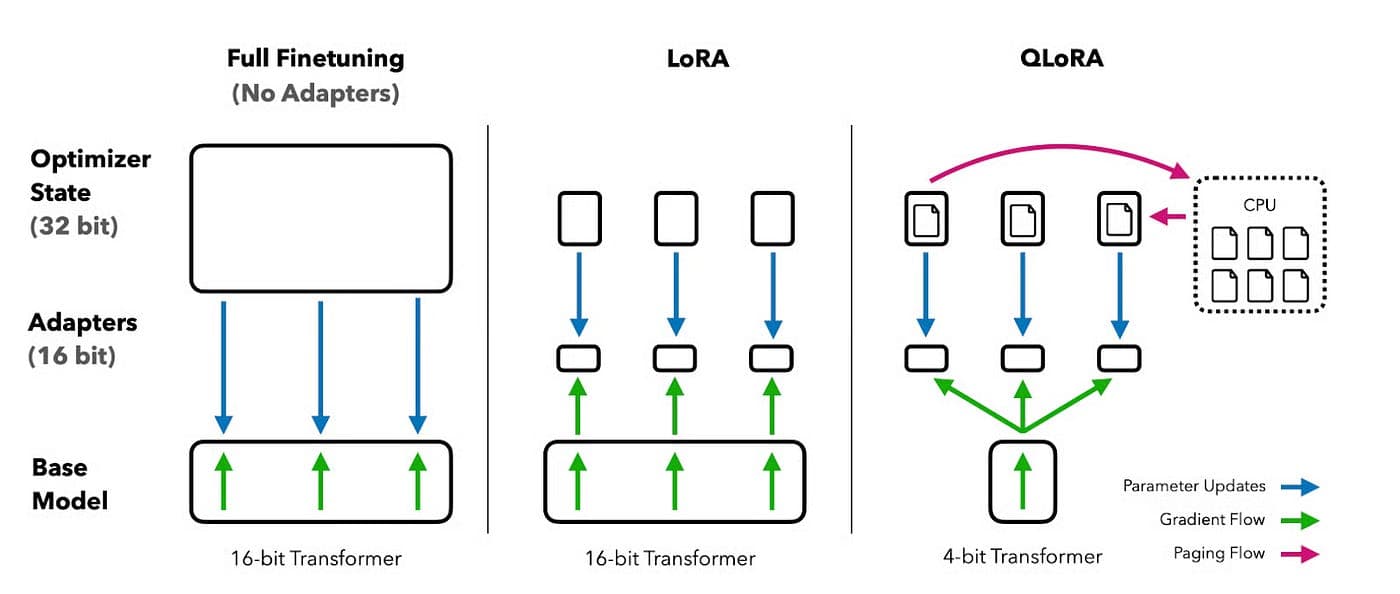
Training large AI models from scratch costs millions of dollars and requires massive computing power. LoRA and QLoRA change that entirely — allowing developers, researchers, and startups to fine-tune powerful AI models on their own data using affordable hardware. This guide breaks down exactly how they work, the hyperparameters that control training quality, and how SmartSchool is applying these techniques to build AI trained on Nigerian curriculum.
01 · Introduction
Why Fine-Tuning Matters
Large Language Models like Llama, Mistral, and GPT are trained on hundreds of billions of words from the internet. They are incredibly powerful. But they are general-purpose.
They do not know your specific curriculum. They do not understand the Nigerian WAEC or NECO examination format. They cannot speak to your students the way your teachers do.
Fine-tuning solves this. It takes a pre-trained model and teaches it new, domain-specific knowledge — your data, your language, your style. The problem historically was cost. Fine-tuning required the same expensive hardware used to train the model originally. Only large tech companies could afford it.
Key Insight
LoRA and QLoRA democratized fine-tuning. What once required a $500,000 compute budget can now be done on a single consumer GPU costing under $1,000. This is not an incremental improvement — it is a fundamental shift in who can build AI.
What is LoRA?
LoRA stands for Low-Rank Adaptation. Introduced by Microsoft researchers in 2021, it has become one of the most widely used fine-tuning techniques in AI development.
The Core Idea
Instead of updating all weights in a massive neural network — which is computationally expensive — LoRA inserts small trainable matrices into specific layers of the model. Only these small matrices are trained. The original model weights remain completely frozen.
concept.txt
# Standard Fine-tuning
Update ALL weights → Billions of parameters → Needs 8× A100 GPUs → $$$

# LoRA Fine-tuning
Freeze ALL original weights
Insert small adapter matrices (A and B)
Only train the adapters → Millions of parameters → Fits on 1 GPU → $
How LoRA Works
In a standard neural network layer, a weight matrix W has dimensions d × d. LoRA instead learns two smaller matrices:
A — dimensions: d × r (the "down" projection)
B — dimensions: r × d (the "up" projection)
r — the rank, typically 4, 8, or 16 — much smaller than d
Weight Update Formula
ΔW = B × A | W_new = W_frozen + (α/r) × B × A
The rank r controls how much capacity the adapter has to learn. Higher rank = more expressiveness, more memory.
Key LoRA Hyperparameters
03 · QLoRA
What is QLoRA?
QLoRA stands for Quantized Low-Rank Adaptation. Introduced by University of Washington researchers in 2023, it takes LoRA one step further by solving the memory problem even more aggressively.
The Key Innovation — 4-bit Quantization
Standard models store weights as 16-bit or 32-bit floating point numbers. QLoRA compresses the frozen base model to just 4-bit precision using a technique called NF4 quantization — dramatically reducing GPU memory requirements.
75%
Memory reduction vs standard 16-bit models
~3.5GB
VRAM needed for a 7B model with QLoRA
$40
Monthly cost to train on Google Colab Pro
LoRA vs QLoRA —
Which Should You Use?
r (rank) — Typical value: 8–16. Controls adapter capacity; higher rank means more learning ability but more memory usage.
lora_alpha — Typical value: 16–32 (usually 2× rank). A scaling factor that controls how much the adapter influences the model's output.
lora_dropout — Typical value: 0.05–0.1. Acts as regularization to prevent the adapter from overfitting to your training data.
target_modules — Typical value: q_proj, v_proj. Specifies which layers receive the adapters; attention layers are the standard target.
LoRA
Requires 16-bit base model in memory
Faster training (no dequantization)
Best with 40GB+ VRAM (A100)
Easier to merge adapters for deployment
Great for production at scale
QLoRA Recommended
4-bit base model — 75% memory savings
Slightly slower due to dequantization
Works on 15GB free Colab GPU
Minimal quality loss with NF4
Perfect for startups and researchers
04 · Configuration
The Complete QLoRA Training Setup
Understanding individual hyperparameters matters. But understanding how they interact — and why — separates good fine-tuning from great fine-tuning.
Learning Rate
The learning rate controls the size of each gradient update step. For QLoRA fine-tuning on 7B models, 2e-4 is the proven starting point. Larger models need lower rates (5e-5 to 1e-4). Always pair with cosine annealing and a 3–5% warmup ratio to prevent early instability.
Number of Training Epochs
One epoch is one complete pass through your training data. 3 epochs is the safe default for most QLoRA setups with datasets of 1,000–10,000 samples. The critical insight: use load_best_model_at_end=True and let the validation loss decide when to stop — not the epoch count.
Weight Decay
Weight decay penalizes large weights, forcing the model to generalize rather than memorize. 0.01 is standard for most datasets above 5,000 samples. Always use AdamW (not Adam) — the 'W' stands for decoupled weight decay, which applies the regularization correctly. Never apply weight decay to bias terms or LayerNorm parameters.
Batch Size & Gradient Accumulation
Physical batch size is constrained by GPU memory. Gradient accumulation solves this by running multiple small batches and accumulating gradients before updating — giving you the benefits of large batches without the memory cost. Target an effective batch size of 16.
Effective Batch Size Formula
Effective Batch = per_device_batch_size × gradient_accumulation_steps × num_GPUsThe Bottom Line
LoRA and QLoRA represent a fundamental democratization of AI fine-tuning. What once required millions of dollars in compute is now achievable on a single affordable GPU. For startups, researchers, and EdTech companies like SmartSchool, this is transformational.
LoRA trains small adapters — the base model never changes
QLoRA compresses the base to 4-bit — cutting memory by 75%
LR 2e-4 · 3 epochs · WD 0.01 · Effective batch 16 is your starting recipe
Watch the validation loss — it always tells the truth
Gradient accumulation gives large-batch benefits on small GPUs
Use AdamW always — never plain Adam with weight decay